Before you start
There’s nothing new to turn on, and no new Intuit sign-in. The QuickBooks connection you already have covers estimates. You need:
- QuickBooks connected, with sync on. See Set up QuickBooks Online.
- An Owner or Administrator. Only they see QuickBooks estimates and can pick one on an invoice. Everyone else who sees estimates sees only the ones made in Stride.
- The customer linked in both. An estimate shows on a Stride customer only when that customer is linked to the QuickBooks customer the estimate is for. The account owner links customers, at setup in Match records or later in Records, under Customers. An Administrator who needs a customer linked asks the owner.
Once sync is on, Stride reads every estimate in QuickBooks once, on its own, shortly after. After that, QuickBooks tells Stride about new and changed estimates, usually within minutes, and Stride checks again once a day. To read them right now, an owner or administrator selects Refresh from QuickBooks in Records, under Estimates.
See QuickBooks estimates on a customer
Open the customer. The Estimates card, right above Invoices, lists the estimates made in Stride and the ones from QuickBooks together, newest first. It shows five, and its count includes both kinds.
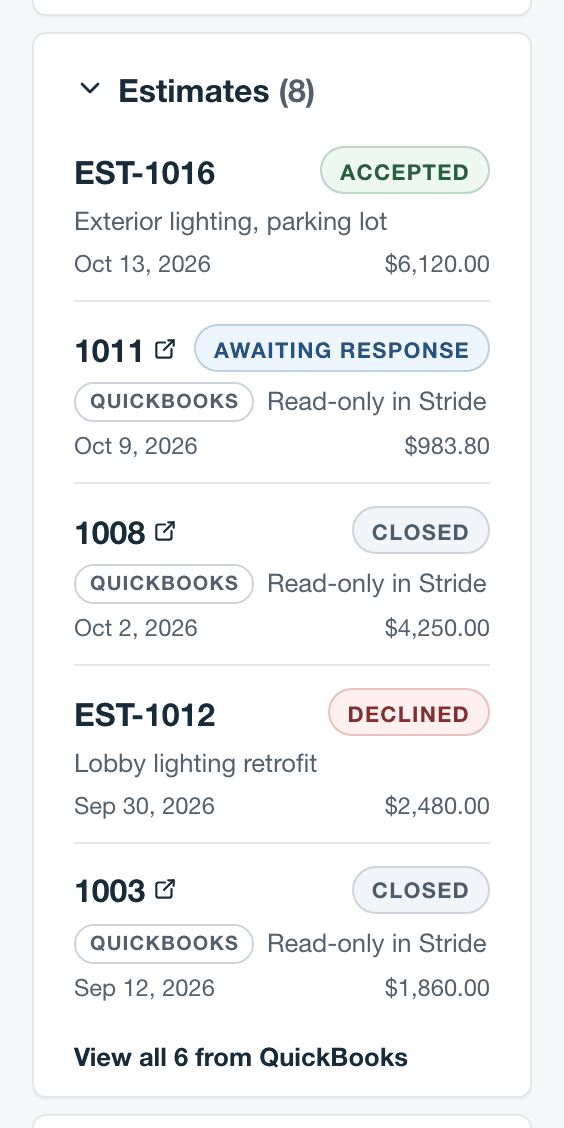
- QuickBooks estimates have a QuickBooks tag and say Read-only in Stride. Select the number to open the estimate in QuickBooks, in a new tab.
- Stride estimates show their subject under the number and open in Stride.
- The View all … from QuickBooks link at the bottom of the card appears when the customer has more QuickBooks estimates than the card shows. It opens Records, under Estimates, with just this customer’s estimates.
| In QuickBooks | In Stride | Can you bill it from Stride? |
|---|---|---|
| Pending | Awaiting response | Yes |
| Accepted | Accepted | Yes |
| Rejected | Declined | No |
| Closed, or converted to an invoice | Closed | No |
| Deleted or made inactive | Deleted | No |
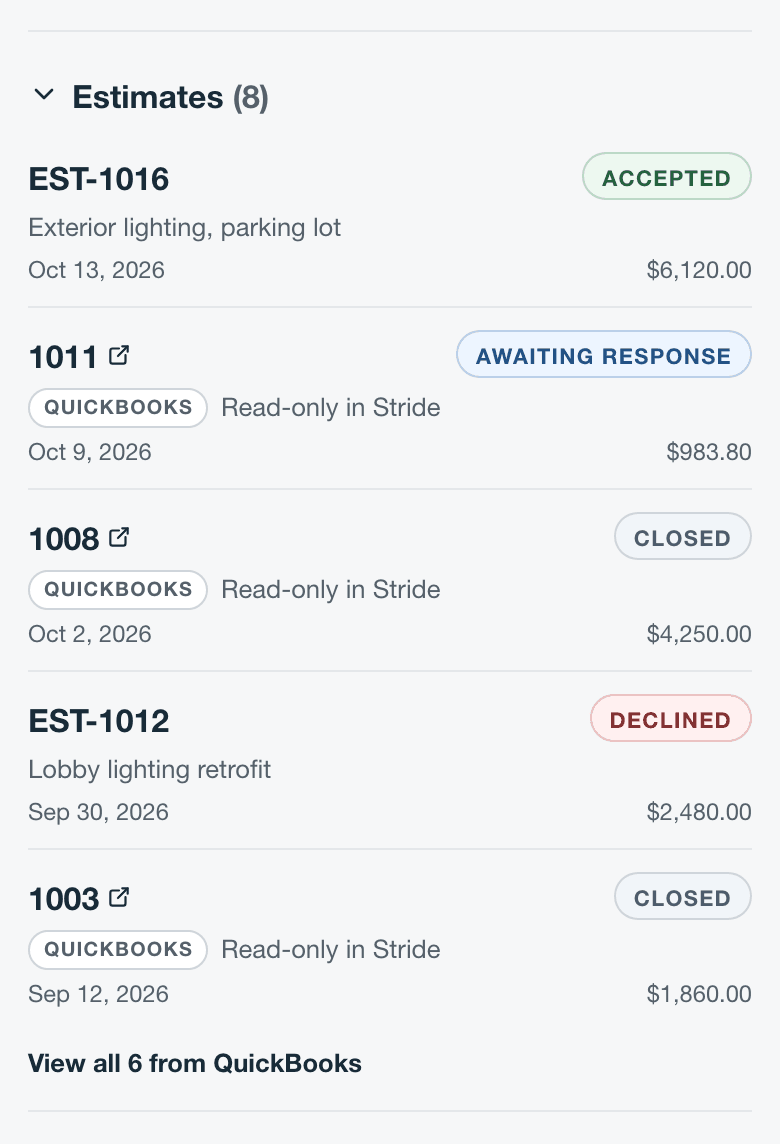
The card is the same on a phone’s web browser:
Bill a QuickBooks estimate
Pick the estimate while the invoice is still a draft. Write the invoice’s lines in Stride as usual; picking an estimate doesn’t copy its lines or amounts.
- Create the invoice for the customer, or open its draft.
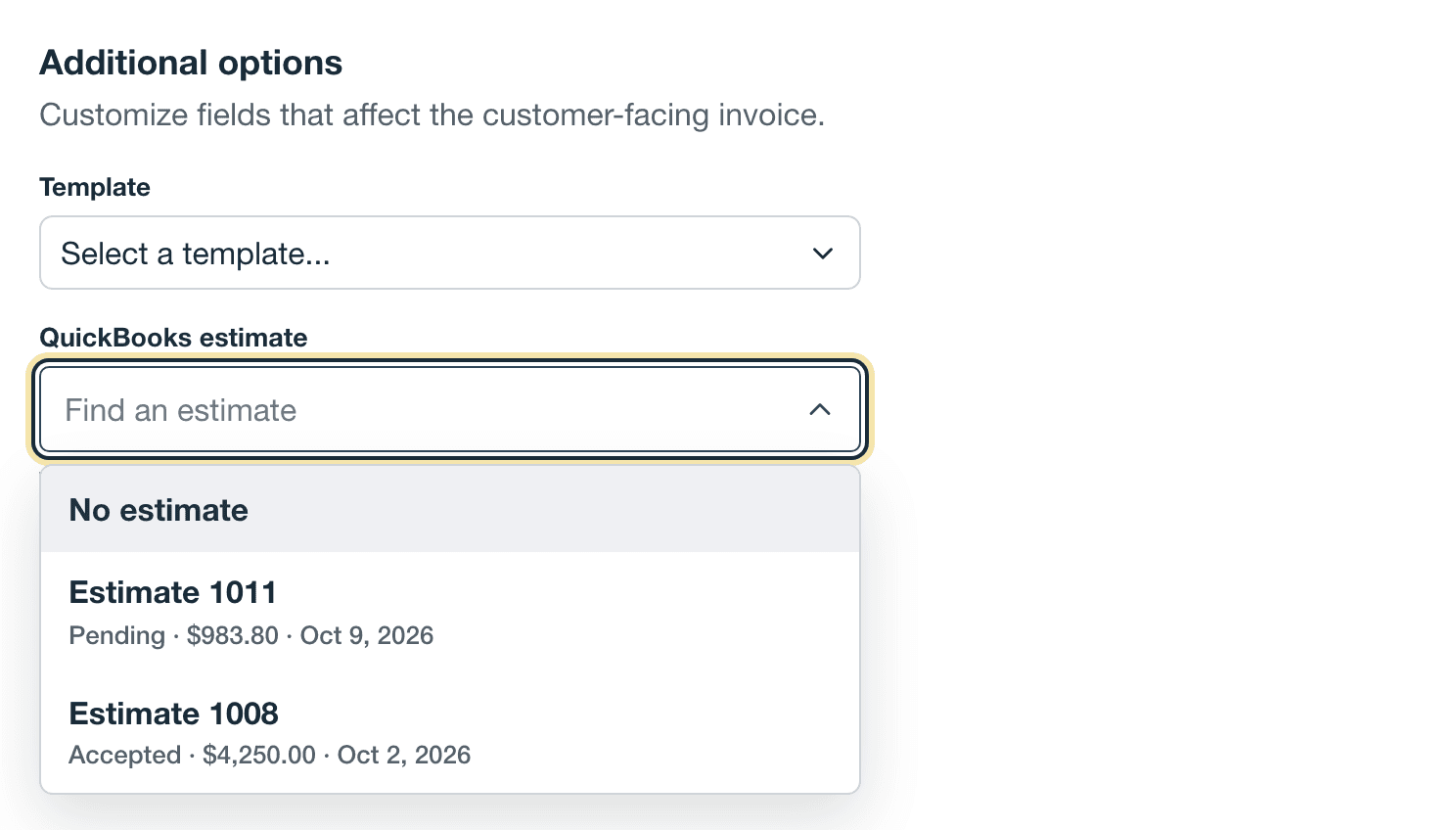
- Under Additional options, select the QuickBooks estimate field.
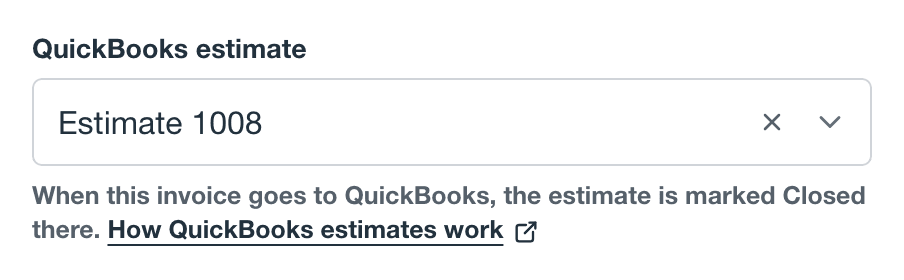
- Choose the estimate. Each choice shows its number, its QuickBooks status (Pending or Accepted), its total, and its date. To take it off again, choose No estimate.
- Select Review invoice, then finalize or send it as usual.
- Which estimates are offered. Only this customer’s QuickBooks estimates that are Pending or Accepted and aren’t already on another Stride invoice.
- One invoice per estimate. An estimate stays with its invoice even if you void the invoice later, so it can’t be picked again.
- Changing the customer on the draft takes the estimate off.
- When the field isn’t there. It shows only to Owners and Administrators, while QuickBooks invoice sync is on and not blocked on sales tax, once the invoice has a customer with an estimate to choose.
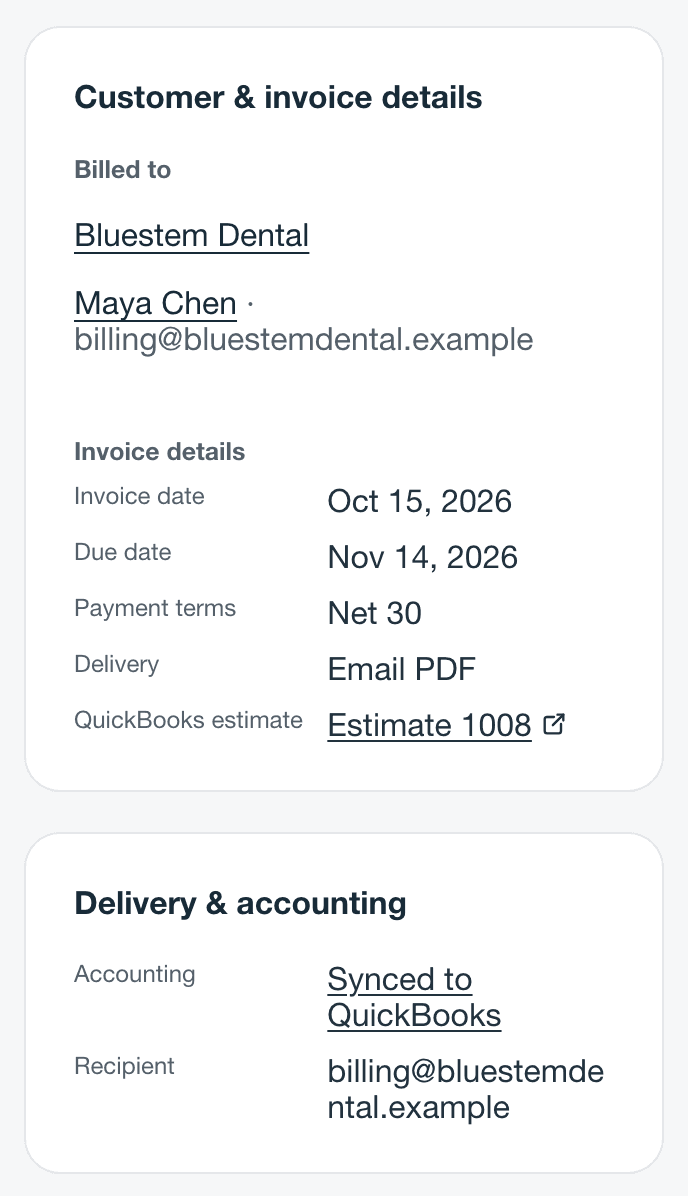
Once the invoice is finalized or sent, the estimate can’t be changed. It shows as QuickBooks estimate under Invoice details on the invoice’s page. Select it to open the estimate in QuickBooks.
What happens in QuickBooks
When you finalize or send the invoice, Stride records it in QuickBooks as usual. Then:
- QuickBooks’ copy of the invoice is linked to the estimate, the same link QuickBooks makes when you convert an estimate.
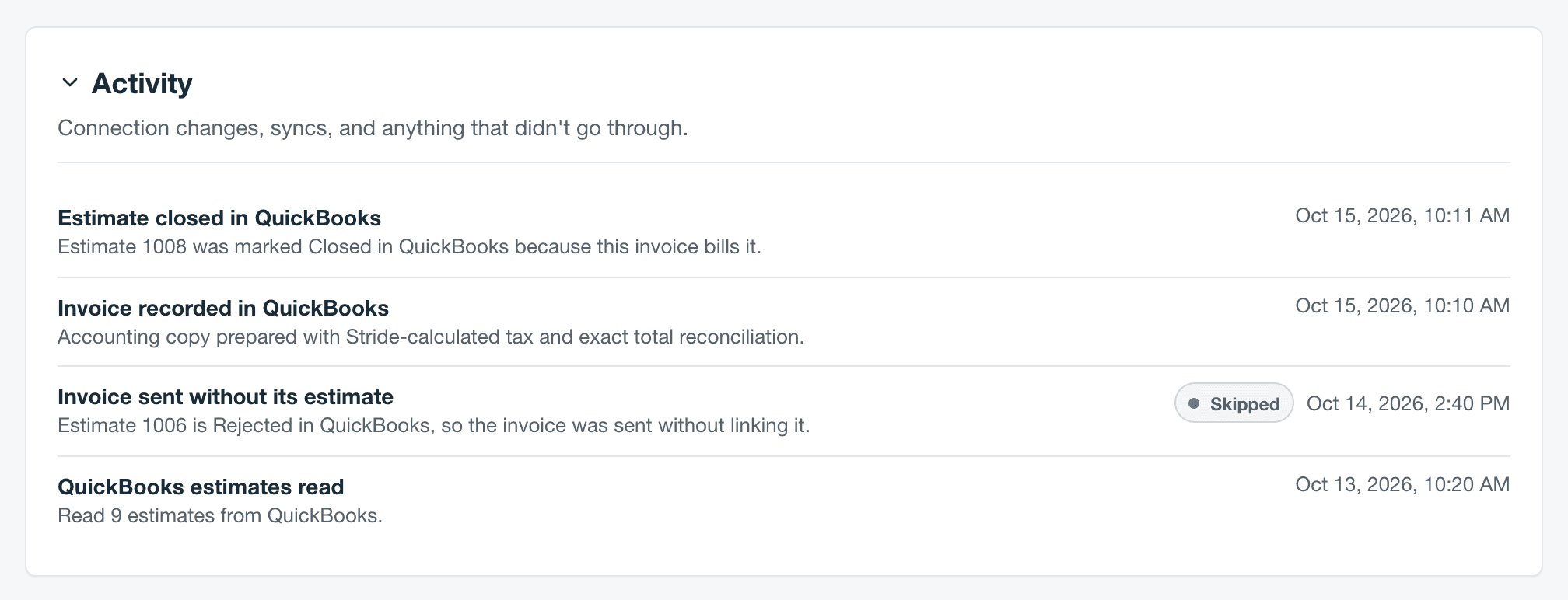
- Shortly after, Stride marks the estimate Closed in QuickBooks, unless it’s closed already.
- Stride only closes the estimate. It never changes the estimate’s lines, amounts, or anything else.
- An estimate never stops an invoice. If the estimate is no longer open (closed, rejected, or deleted), belongs to a different customer, is already invoiced in QuickBooks, or Stride can’t read it (for example, after QuickBooks was reconnected to a different company), Stride sends the invoice without the link and leaves the estimate as it is. QuickBooks refusing the link works the same way.
- Activity says what happened. On the QuickBooks page, open Activity. Estimate closed in QuickBooks means it worked. Invoice sent without its estimate gives the reason the link was skipped. Estimate couldn’t be closed has a Failed or Retrying badge. With Failed, close the estimate in QuickBooks yourself. With Retrying, Stride tries again on its own.
- Voiding the invoice in Stride before the estimate is closed stops the close; the estimate stays open in QuickBooks. Voiding it after doesn’t reopen the estimate.
Find every QuickBooks estimate
Go to Settings, then Integrations, then QuickBooks. Under Records, select Estimates. It lists up to the newest 500 QuickBooks estimates Stride has read, newest first, with its customer, date, total, and status.
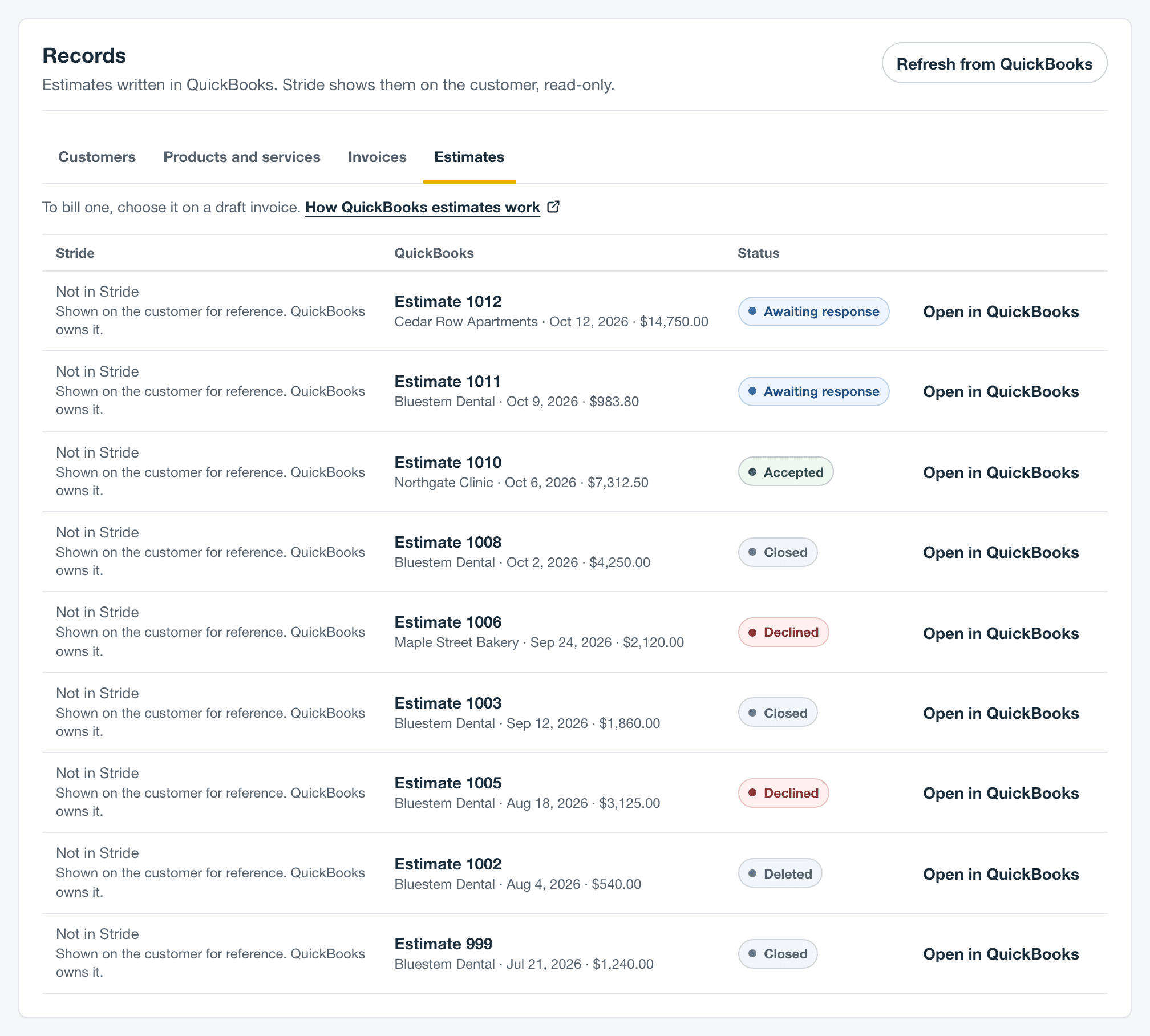
- Open in QuickBooks opens the estimate in QuickBooks, in a new tab.
- Refresh from QuickBooks reads every estimate again now. Owners and administrators can use it. Use it if one you just wrote or changed in QuickBooks isn’t showing yet.
- Each row says Not in Stride because the estimate lives in QuickBooks. Stride doesn’t send its own estimates to QuickBooks.
Fix common problems
| Problem | Why | What to do |
|---|---|---|
| An estimate isn’t on the customer | The Stride customer isn’t linked to the QuickBooks customer the estimate is for, or Stride hasn’t read the estimate yet. | The account owner links the two under Records, then Customers; an Administrator asks the owner. Then an owner or administrator selects Refresh from QuickBooks under Estimates. |
| An estimate isn’t in the QuickBooks estimate list | It isn’t Pending or Accepted in QuickBooks, it’s for a different customer, or it’s already on another Stride invoice, including a voided one. | Check its status under Records, then Estimates. If it’s on another draft, choose No estimate on that draft first. |
| The QuickBooks estimate field isn’t there | You aren’t an Owner or Administrator, QuickBooks invoice sync is off, sales tax is blocking invoice sync (the invoice editor says QuickBooks invoice sync is off for this account, even though the QuickBooks page shows Connected), the invoice isn’t a draft, or the customer has no estimate you can pick. | Ask an Owner or Administrator. If the QuickBooks page asks about sales tax, answer it under Services and billing. Check that the customer has a Pending or Accepted estimate. |
| The estimate is still open in QuickBooks | The invoice was voided before the close, the close failed, or the link was skipped. | Open Activity on the QuickBooks page to see why. If it shows Estimate couldn’t be closed with a Failed badge, close the estimate in QuickBooks yourself. With Retrying, Stride tries again on its own. |
| The invoice isn’t linked to the estimate in QuickBooks | Something changed in QuickBooks before the invoice got there, such as the estimate being converted, rejected, deleted, or moved to another customer. | Invoice sent without its estimate in Activity gives the reason. The invoice is in QuickBooks either way. |
Questions
Can I bill part of an estimate now and the rest later? Not from Stride. Each estimate goes on one invoice, and progress invoicing isn’t supported.
Do Stride estimates go to QuickBooks? No. Stride doesn’t send its own estimates to QuickBooks.
Can I edit a QuickBooks estimate in Stride? No. Change it in QuickBooks; Stride picks up the change.
Does the phone app show QuickBooks estimates? Not yet. Use Stride in your phone’s web browser, which shows the same card.
Something not working? Email us.